
Every call answered. Every request captured.
Calls answered, logged and routed, with AI answering that captures requests even when your team is busy. Families reach a calm voice at any hour, and your team gets a clear summary of what they need.
Illustrative mockups with a fictional brand, callers and data.
From ring to follow-up.
A call comes in
Your team picks up, or AI answering takes the call when everyone is busy or after hours.
The request is captured
Who called, about which pet, and what they need.
Logged with a summary
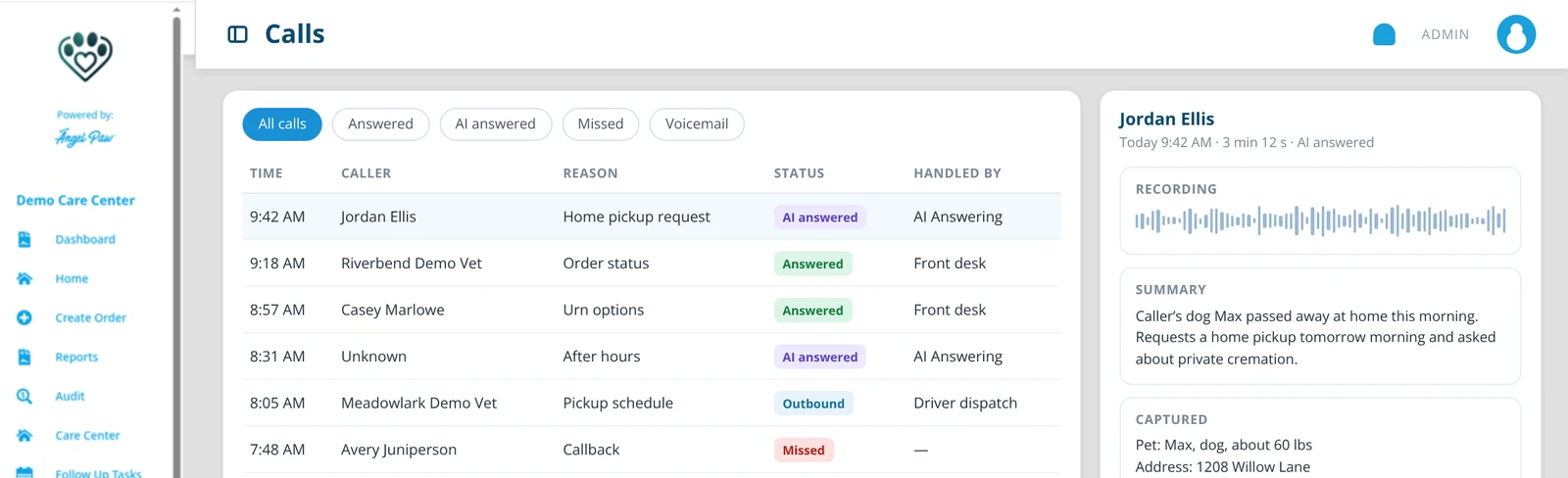
Every call is listed with its status, recording and summary.
Routed to the right person
Your team follows up, calls back or creates the order.
Every call in one place.
See answered, AI answered, missed and outbound calls side by side. Open a call to hear the recording, read the summary and see the details that were captured.
- Filter by answered, AI answered, missed or voicemail
- A short summary for every call
- Call back or create the order from the call
Illustrative mockup with fictional data.
A gentle first answer, at any hour.
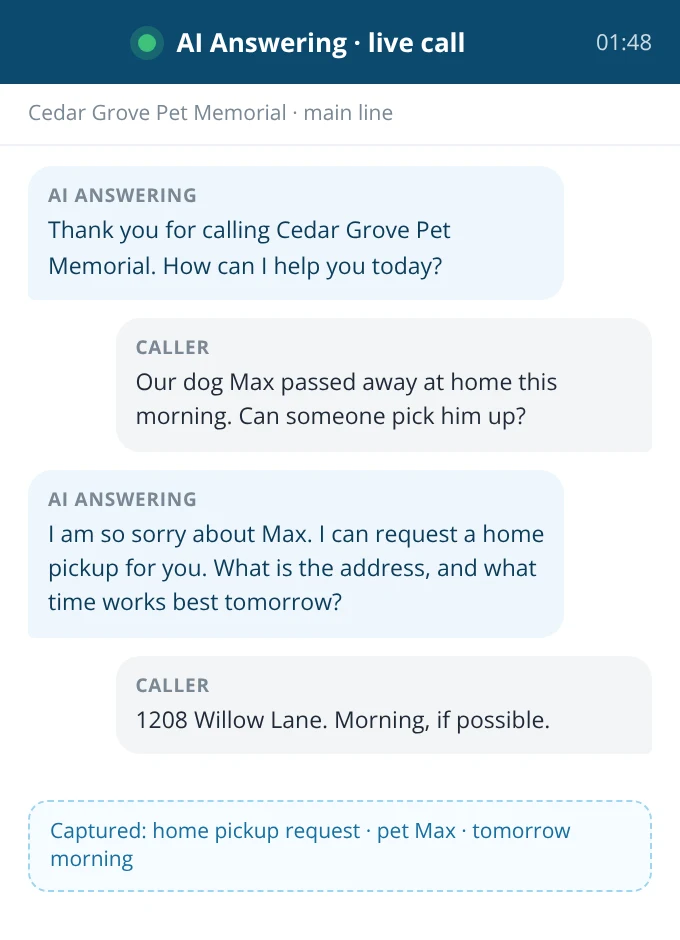
When your team cannot pick up, AI answering greets the caller with your care center’s name, answers common questions and captures the request, so no family is left with a voicemail box on a hard day.
- Answers common questions about services, hours and next steps
- Captures the caller, the pet and the request
- Hands the conversation to your team with a summary
Illustrative mockup with a fictional brand and caller.
Every call to the right person.
Set simple rules for who gets each call: partner clinics ring the vet line first, drivers reach dispatch, families with an open order are shown to whoever answers, and anyone who asks for a person is transferred right away.
- Rules by caller, number, time of day and holiday calendar
- Warm transfer with the summary so far
- Separate numbers and greetings per location
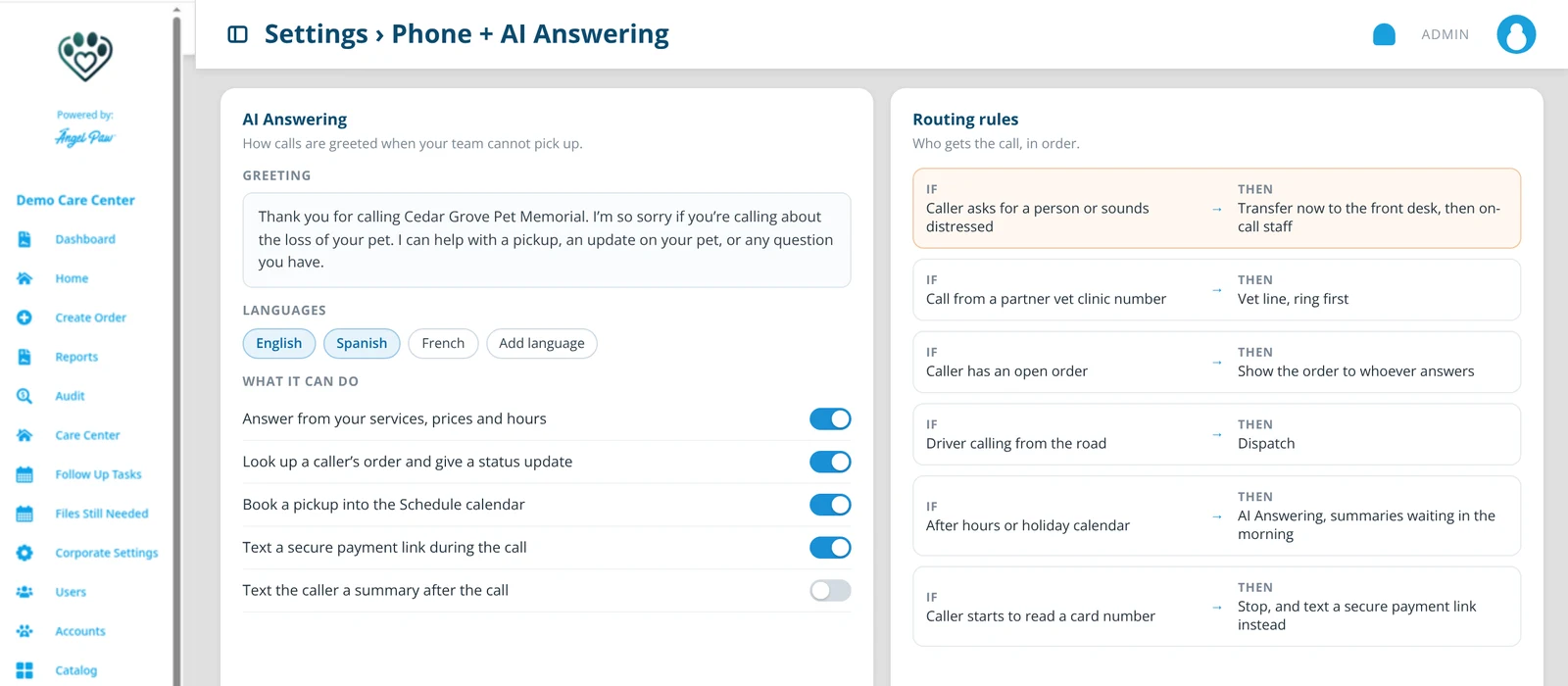
Illustrative mockup with a fictional brand.
More than a voicemail that talks back.
AI answering works from your Angelpaw data, so it can do the things families actually call about.
Knows who is calling
Matches the number to a pet parent, partner clinic or driver, and to any open order.
Answers “where is my pet?”
Gives the family a status update from the order, in plain words.
Books the pickup
Offers open times from your Schedule calendar and books the pickup during the call.
Payment links, never card numbers
Texts a secure payment link instead of taking card details by voice.
Knows when to step back
Hands the call to a person right away when a caller is upset or asks for one, with everything captured so far.
Speaks the family’s language
Greets and answers in the languages you choose, with your care center’s name and tone.
Everything your team expects from VoIP, next to the order.
Click to call
Call a family, clinic or driver from the order with one click.
The order pops up
Incoming calls show the caller’s open order before anyone says hello.
Recordings and transcripts
Every call, with its recording, transcript and summary, on the order’s history.
Texts from your number
Send and receive texts from the same business number families already call.
Hours and holidays
Business hours and your holiday calendar decide when AI answering steps in.
Call reporting
Answered, AI answered, missed and callbacks due, by location and by day.
More time for the families in front of you.
When the phone and the counter compete for attention, AI answering takes the first call so your team can stay with the family at the desk.

Common questions
What does AI answering do?
It answers calls your team cannot pick up, responds to common questions, captures the caller’s request and hands it to your team with a summary.
Does it replace my team?
No. It covers the moments when everyone is busy or the office is closed. Your team still follows up and creates orders.
Can I see every call?
Yes. Calls are listed with their status, and each call can show its recording, summary and captured details.
What happens when a caller is upset or asks for a person?
AI answering transfers the call to your team right away, with a summary of what has been captured so far.
Can AI answering take card payments?
It never takes card numbers by voice. It texts the family a secure payment link instead.
Is it available for my care center?
Yes. VoIP + AI Answering is live for Angelpaw care centers. Talk to our team to set up your numbers, greeting and routing.