
Routes that plan themselves.
Angelpaw places every pickup and return on the best route the moment the order is placed, optimizes the drive with live traffic, and keeps your standing vet runs exactly where you want them. Dynamic, static or both.
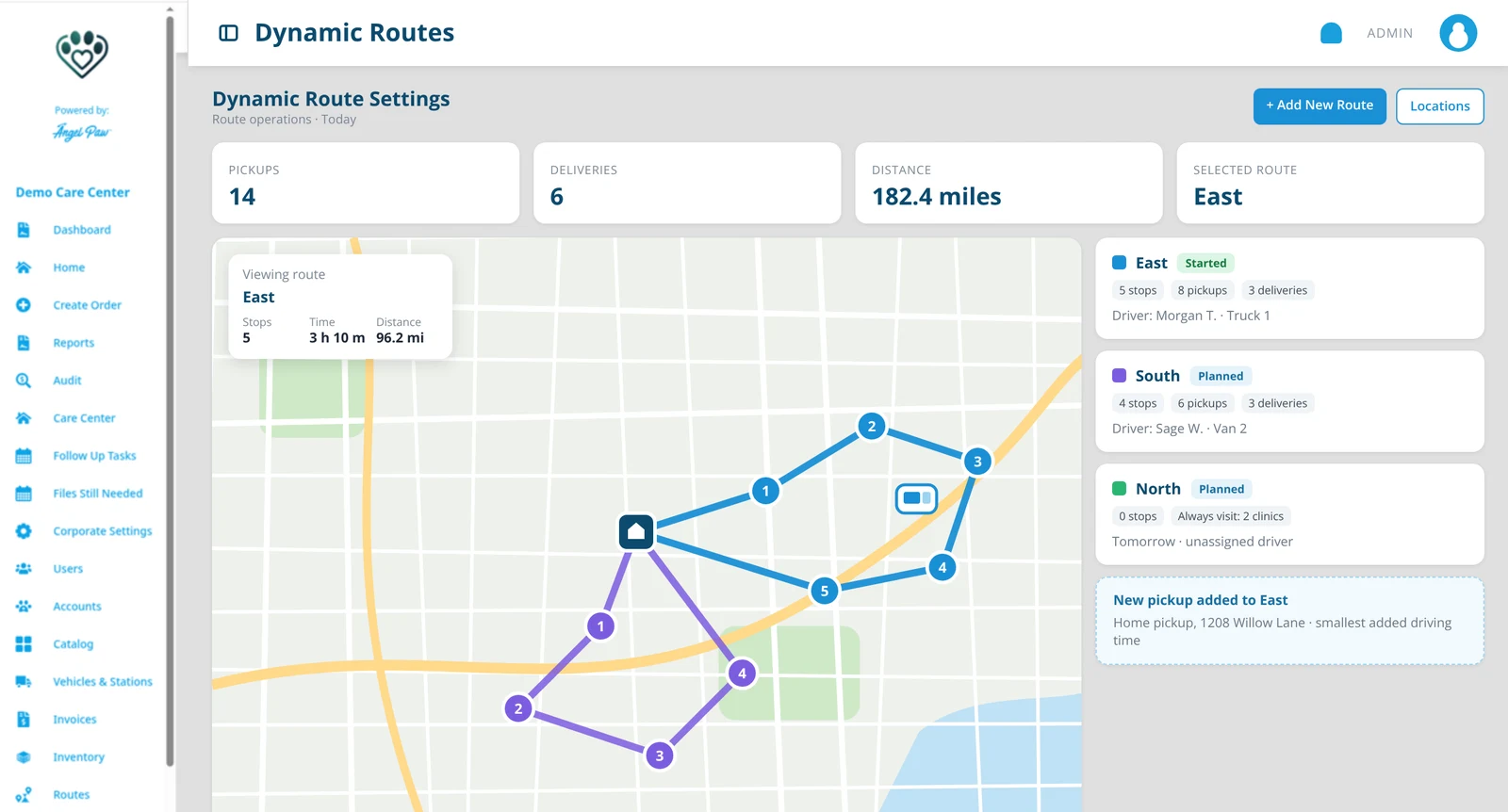
Illustrative mockup based on the Angelpaw Dynamic Routes screen, with fictional routes and addresses.
Predictable where it helps. Flexible where it matters.
Static routes
Predefined vet routes that vans follow regularly, ideal for routine clinic schedules.
Dynamic routes
Adjusted as orders come in from the phone, e-commerce or vet partners, based on where your vans are.
Hybrid routes
Standing vet stops plus the day’s new pickups and returns, on the same run.
Every order finds its route on its own.
Pickups and deliveries are placed on routes the moment orders are placed, updated or staged for return. Staff can always override on the order.
Recurring rule
A location’s future pickups or deliveries always go to the route you chose.
Always visit
Clinics visited on a route even with no pets pending.
Existing stop
A route already stopping at that address takes the pet with no extra driving.
Geofence
A route with a drawn territory absorbs the addresses inside it.
Best fit
The route with the smallest added driving time wins, within its limits.
New route
If nothing fits, a fresh route is opened for today.
Shape every run in one screen.
Set the planned departure, enabled weekdays, driver and vehicle, maximum driving time and distance. Drag stops to reorder them, move them to another route, or let Optimize route re-sequence them for the shortest drive.
- Optimization with live traffic
- Started routes only re-sequence unvisited stops
- Driver and vehicle lock once the route starts
- The care center is always the first and last leg
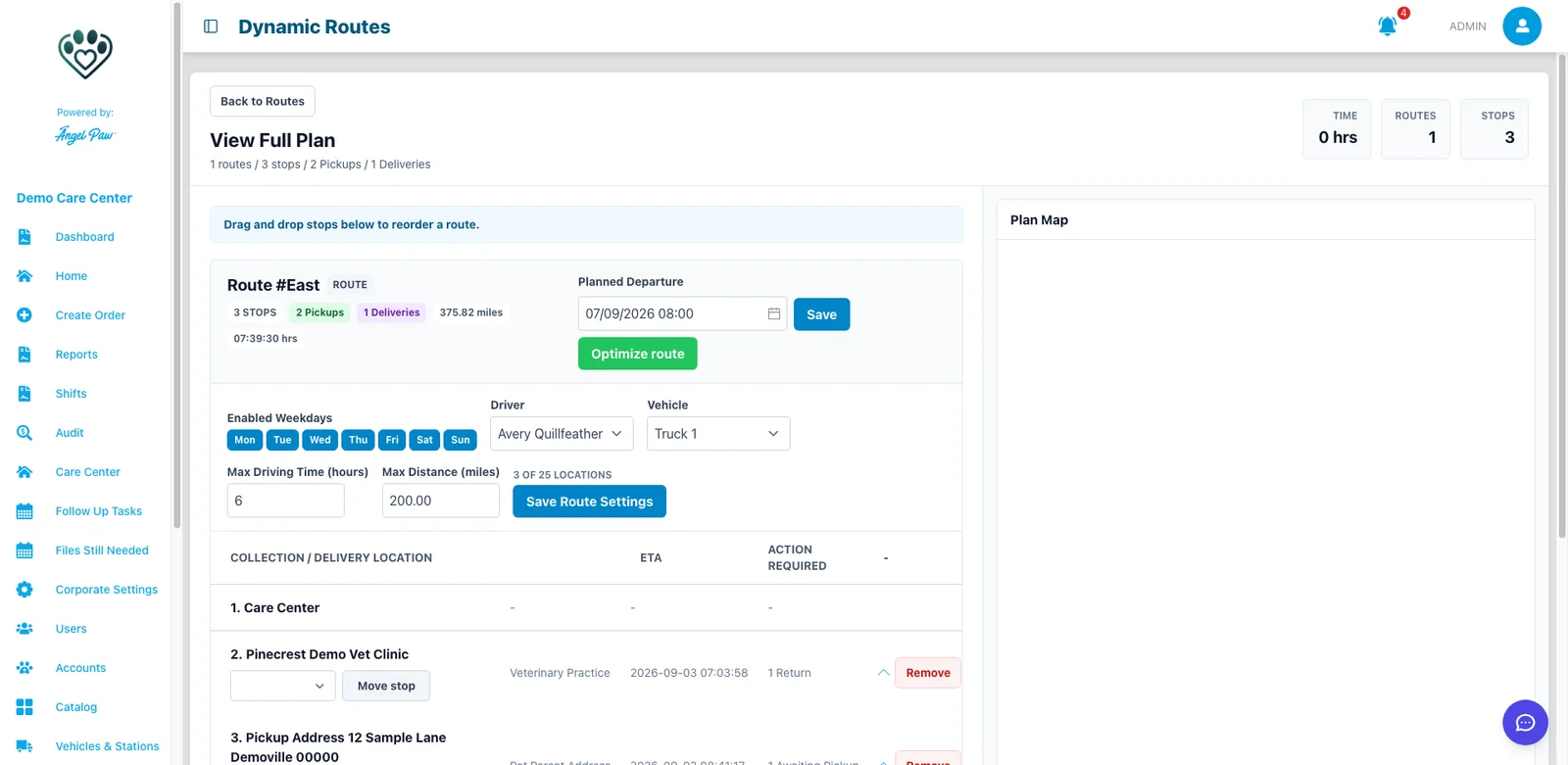
Real Angelpaw screen from a demo care center.
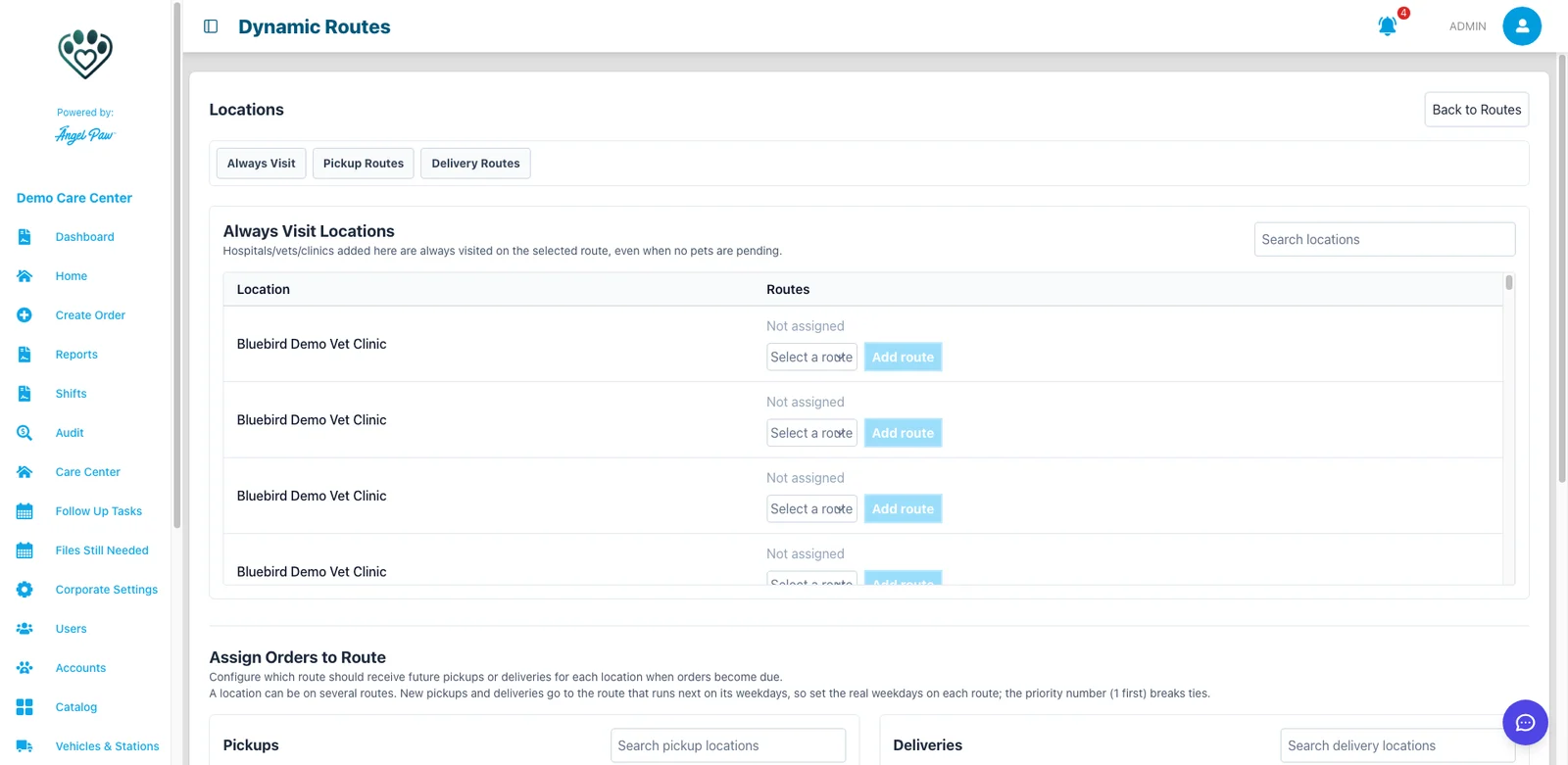
Real Angelpaw screen from a demo care center.
Your regular vet runs, kept regular.
On the Locations screen, mark clinics to always visit on a route and choose which route receives each location’s future pickups and deliveries. These rules outrank everything else in the engine.
- A location can belong to several routes
- Priority breaks ties between routes
- New work goes to the route that runs next
See what actually happened on every run.
Every time a pet is picked up into a vehicle, Angelpaw keeps a permanent pickup record: which pet, when, from where, into which vehicle and who did it. Run history shows every driver run with each stop and the pets handled there.
- Source badges: operator scan, driver app or web portal
- Kept even after check-in or a route reset
- Newest run opens expanded
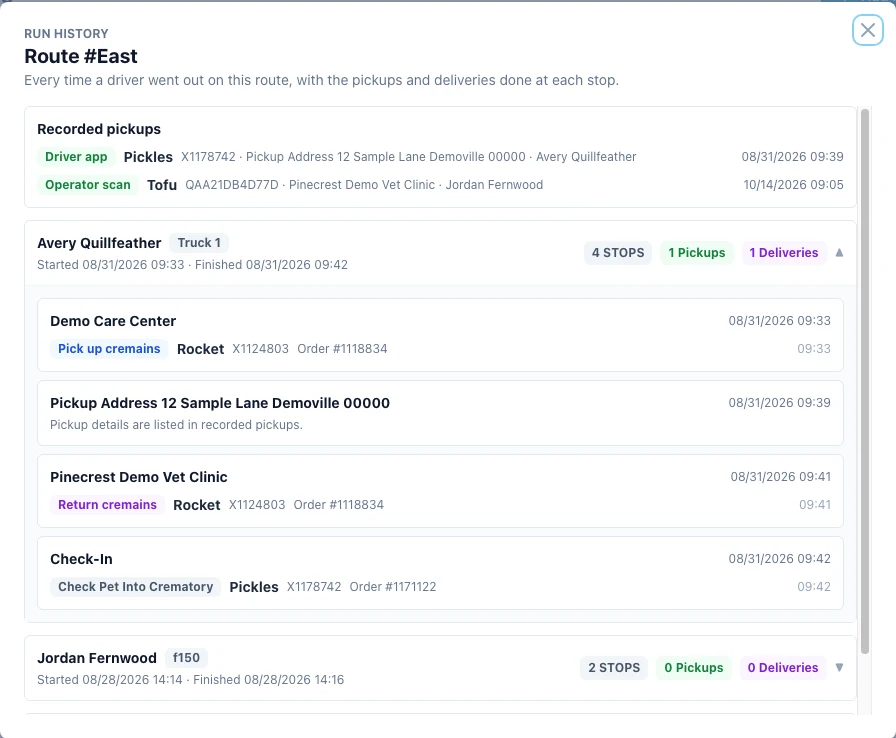
Real Angelpaw screen from a demo care center.
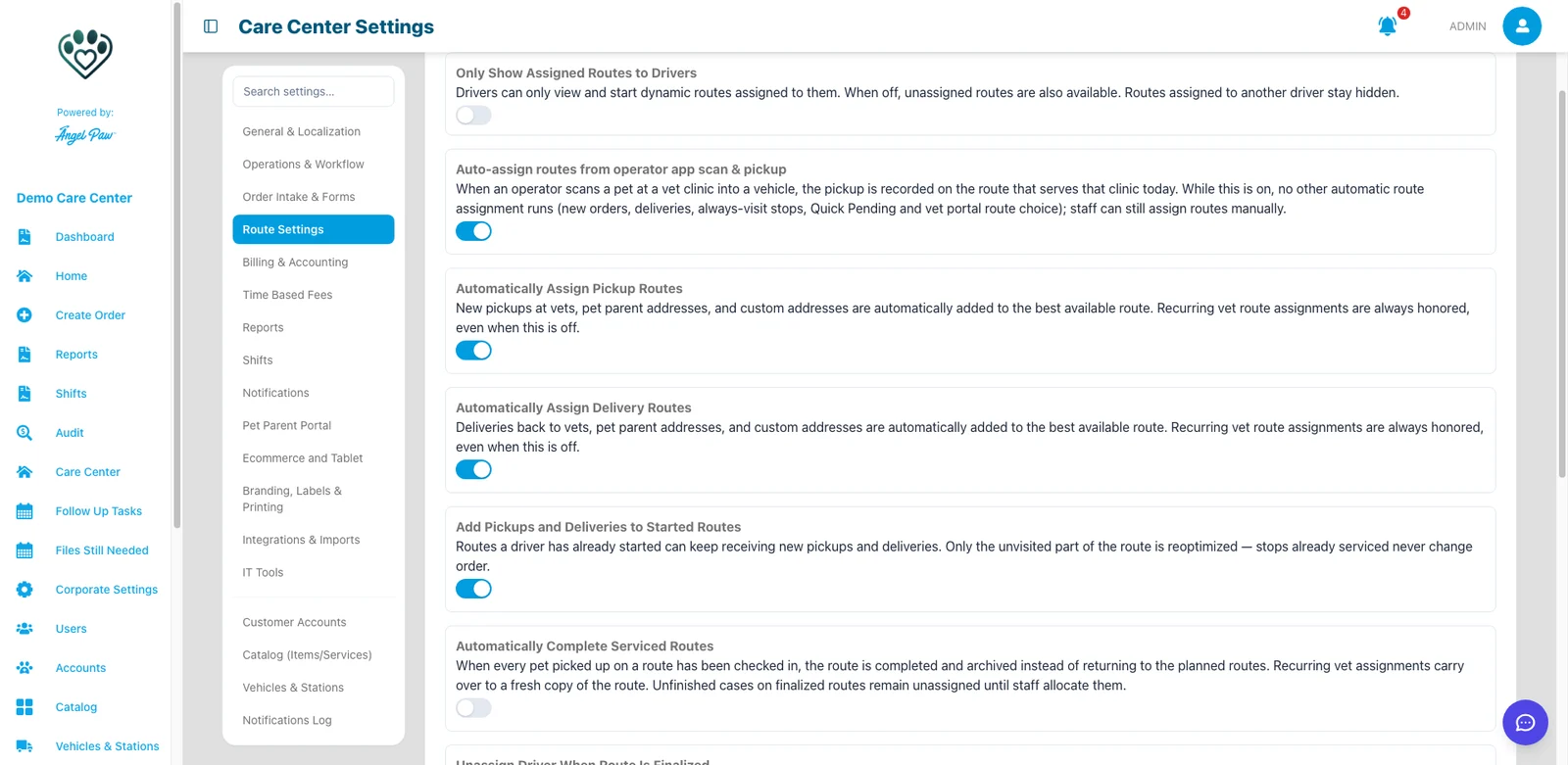
Real Angelpaw screen from a demo care center.
Plan ahead, or route what was collected.
Choose how much the engine does for you: automatic assignment for pickups, deliveries and unconfirmed pickups, adding work to started routes, completing serviced routes, and how many days ahead to plan. Or switch to routes built from what operators scan into a vehicle.
Drivers and families stay in the loop.
Driver app
Drivers claim a route with a vehicle, see stops and pets, and add pets waiting at a stop.
Live van location
GPS tracking shows where vans are, so routes can adapt to new pickups.
Last-mile updates
Families receive updates for home pickups and returns.
Chain of custody
Pet parents and vets sign digitally for handoffs.
Limits that hold
Max driving time and distance per route, with care center defaults.
Missing addresses flagged
A route showing 0 distance is your signal that an address needs geocoding.
The right van at the right door.
Routing works from the same orders as tracking and invoicing, so dispatch, drivers and the office all see the same plan.
See Drivers App + Comms
Common questions
What is the difference between dynamic and static routes?
Static routes are predefined vet runs. Dynamic routes adjust as new orders come in. Hybrid routes combine standing stops with the day’s new work.
How does Angelpaw choose a route for a new order?
It checks recurring rules, always-visit clinics, existing stops and geofences first, then picks the route with the smallest added driving time within its limits, or opens a new route.
How many stops can a route have?
The number of unique locations depends on the map provider: up to 19 with Mapbox and up to 25 with Google Maps. Several pets at one location share a single slot.
Can staff move a pet to another route?
Yes. Staff can assign, move and remove pets on routes from the order, the order list and the route editor.
Can routes be built from what drivers actually collect?
Yes. With scan-based routing on, a pickup is placed on a route when an operator scans the pet into a vehicle at a clinic.